Landscaping Client Payment Tracking Tips That Work
Effective landscaping client payment tracking means logging, managing, and reconciling every client invoice and payment through one system instead of scattered apps or paper records. Poor tracking costs landscaping businesses real money. Manual invoice creation and tracking can eat up hours every week and leave cash flow exposed to late billing and messy records. Tools like Tendr.me, Jobber, and AllBetter Field exist to reduce that friction by tightening the path from completed job to confirmed payment.
1. Landscaping client payment tracking starts with one system
The single biggest mistake small landscaping businesses make is splitting payments across Cash App, Venmo, Zelle, and a spreadsheet. Patchworking consumer apps with spreadsheets falls apart as a business grows, especially when tax time hits. One platform handles everything better than four platforms handling pieces. A unified system gives you one place to see who owes you, what has been paid, and what is overdue.
Tendr.me is built for exactly that cleanup. It gives small service businesses a professional way to request payment, track invoice status, and keep cleaner records without the overhead of a full accounting stack.

2. Choose the right software for your business size
The right invoicing and payment platform depends on how many clients you manage and how complex your jobs are. Here is how the leading options compare for small landscaping businesses.
| Platform | Best For | Key Features | Cost |
|---|---|---|---|
| Tendr.me | Solo operators and small crews | Invoicing, payment tracking, free forever | Free |
| Jobber | Growing businesses (10+ clients) | CRM, scheduling, client portal, reminders | Paid plans |
| AllBetter Field | Field service teams | Mobile invoicing, job tracking, reporting | Paid plans |
| Knockio | Quote management and field sales | Quote management, digital signatures | Paid plans |
| Aspire | Large landscaping operations | Full ERP, job costing, payroll integration | Enterprise |
For most small landscaping businesses just getting serious about billing, Tendr.me is the lowest-friction entry point. Jobber and AllBetter Field make more sense once you are managing larger recurring route volume and need deeper scheduling or field-team features.
Pro Tip: Do not pay for features you will not use in year one. Start with a simple system, build the habit of consistent invoicing, then upgrade when your client volume actually demands it.
3. Invoice immediately after every job
Invoicing immediately after job completion is one of the simplest ways to reduce cash flow gaps. Every hour you wait to send an invoice is an hour the client is not thinking about paying you. Same-day invoicing keeps the job fresh in the client’s mind and signals professionalism.
The workflow is simple: finish the job, open your invoicing app, send the invoice before you leave the driveway. With a mobile-friendly platform, this takes only a couple of minutes. Clients who receive invoices quickly tend to pay faster than clients who receive them days later.
4. Automate recurring invoices for maintenance clients
Recurring maintenance contracts are the backbone of many landscaping businesses. Manual invoicing becomes unsustainable once you have enough repeat clients on the schedule. Automated recurring billing reduces that drag.
Set up a recurring invoice once, and the system sends it automatically on your schedule, whether that is weekly, biweekly, or monthly. Your client gets a consistent, professional invoice every time without you having to rebuild it from scratch. This also reduces the chance of forgetting to bill a client after a busy week.
Platforms like Jobber and AllBetter Field support recurring billing natively. Tendr.me handles straightforward recurring payment requests without the overhead of a full scheduling system.
5. Set up automated payment reminders
Chasing payments manually is exhausting and awkward. Auto-sending payment reminders before and after due dates keeps invoices top of mind and cuts the need for manual follow-up. A practical reminder schedule is three days before the due date, on the due date itself, and at regular intervals after the invoice goes overdue.
A good reminder is short, professional, and includes a direct payment link. Clients often pay late because life gets busy, not because they are acting in bad faith. A well-timed reminder removes friction and gets you paid without an awkward phone call.
Pro Tip: Keep reminder messages warm and brief. Something like “Hi [Name], just a quick note that your invoice for last week’s service is due tomorrow. Here is your payment link.” That tone gets results without souring the relationship.
6. Use client portals to reduce administrative back-and-forth
A professional self-service client portal reduces follow-up and builds trust by letting clients view invoices and pay on their own schedule. Clients can check payment history, download receipts, and pay outstanding balances without calling or texting you. That is time back in your day.
Client portals also reduce disputes. When a client can see a clear invoice with service dates, line items, and amounts, there is less room for confusion. Jobber and AllBetter Field both offer client-facing portals as part of their paid plans.
7. Log every payment the day it happens
Logging every financial transaction immediately is a small habit that saves a lot of cleanup later. The “reconstruction trap” is what happens when you wait until December to figure out what you earned in April. It is painful, error-prone, and avoidable.
Build a daily habit: when a payment comes in, log it right then. Mark the invoice as paid in your platform. Note the payment method if your workflow needs it. At year-end, your records are cleaner and easier to hand to a CPA.
8. Keep business and personal payments completely separate
Mixing personal and business payments is one of the fastest ways to create a tax headache. Open a dedicated business checking account and route all client payments through it. Do not accept landscaping payments into your personal Venmo or bank account.
Using a single platform for invoicing and payment tracking keeps income and collections easier to categorize and review. This separation also makes the business look more professional to clients.
9. Offer multiple payment options to get paid faster
Clients pay faster when paying is easy. Accepting only cash or check is leaving money on the table. Offer cards, ACH bank transfers, and online payment links as standard options whenever your billing system supports them.
Payment links for deposits and milestone payments on larger projects improve payment speed and reduce confusion. A client who can tap a link and pay in 30 seconds is far more likely to pay on time than one who has to write a check and remember to mail it.
10. Require deposits on large projects
For any landscaping project over a meaningful threshold for your business, require a deposit before work begins. A deposit confirms the client is serious, covers material costs up front, and reduces the risk of non-payment after the work is done.
For larger projects, use milestone billing. Collect a portion up front, another portion at a defined midpoint, and the remainder on completion. This keeps cash flowing through the job instead of waiting for one large payment at the end.
11. Review your accounts receivable weekly
Accounts receivable is the money clients owe you but have not yet paid. Reviewing AR every week prevents small overdue balances from turning into large, stale debts. A weekly 10-minute review tells you exactly who is overdue, by how much, and for how long.
Set a personal rule: any invoice more than 14 days overdue gets a direct phone call, not just another email reminder. Most late payments are the result of oversight, not refusal. A friendly call resolves many overdue accounts quickly.
12. Prepare for tax season year-round
Tax season is stressful only when your records are a mess. Maintaining clean, real-time payment records throughout the year makes filing much easier. Every invoice sent, every payment received, and every discrepancy caught early removes work from the end of the year.
Use your invoicing platform’s reporting features to pull monthly revenue summaries. Cross-check those against your business bank account monthly. If the numbers do not match, find the discrepancy immediately rather than six months later.
Key takeaways
Consistent, automated payment tracking is one of the most effective ways for landscaping businesses to protect cash flow and reduce administrative burden.
| Point | Details |
|---|---|
| Use one unified platform | Replace scattered apps with a single system for invoicing, tracking, and records. |
| Invoice the same day | Send invoices immediately after job completion to accelerate payment timelines. |
| Automate reminders | Schedule reminders before and after the due date to cut manual follow-up. |
| Log payments daily | Record every payment when it arrives to avoid year-end reconciliation chaos. |
| Require deposits on big jobs | Collect a meaningful upfront payment on larger projects to protect cash flow. |
Why I think most landscapers are solving this problem backwards
Here is what I have seen over and over: landscaping business owners buy expensive software to fix a billing problem that is really a habit problem. They sign up for a larger platform, spend a weekend setting it up, and then still wait three days to invoice because the habit never changed.
The software is not the hard part. The habit is the hard part.
The businesses that actually improve cash flow usually do two things first. They pick one tool and commit to it. Then they build the discipline of same-day invoicing before they worry about every other feature. Recurring billing, client portals, and automated reminders work better once that foundation is solid.
The other thing worth saying plainly: you do not need a giant platform to look professional. A clean, simple invoice sent the same day you finish a job signals more professionalism than a feature-rich system that sends invoices late. Clients notice responsiveness. They notice when you have your act together. That perception affects how quickly they pay.
Start simple. Build the habit. Then add complexity only when your volume demands it. That sequence works much more often than the reverse.
— Carrie Cash
Stop chasing payments. Try Tendr.me.
If your current billing setup involves texting payment requests, chasing clients on Venmo, or rebuilding your records at year-end, there is a better way.
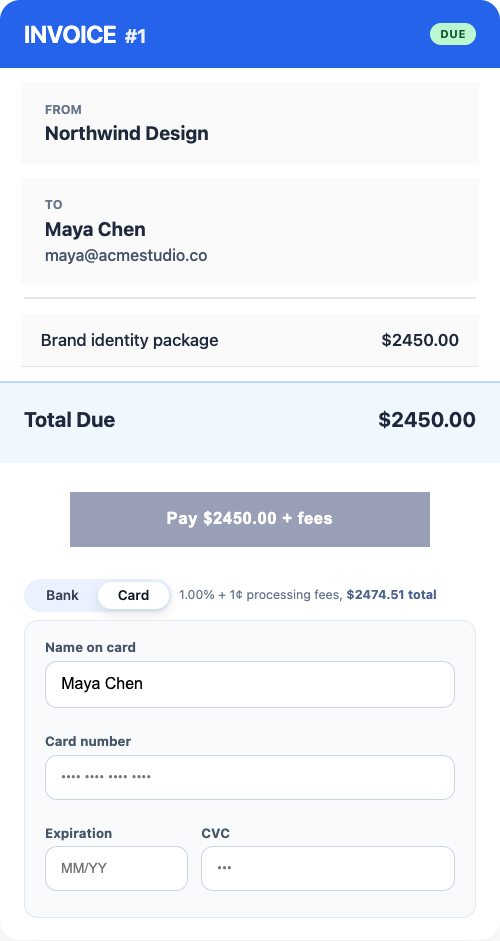
Tendr.me is built for exactly this situation. You can send professional invoices, track payments, and keep cleaner records without stitching together consumer apps and spreadsheets. For a small landscaping business, that means less time chasing money and less time cleaning up the books later.
FAQ
What are the best landscaping client payment tracking tips?
The most effective tips are same-day invoicing, automated payment reminders, and logging every payment immediately. Using one unified platform instead of multiple consumer apps prevents record-keeping errors and improves cash flow.
How do I track client payments for my landscaping business?
Use a dedicated invoicing platform like Tendr.me, Jobber, or AllBetter Field to send invoices, record payments, and monitor outstanding balances in one place. Review your accounts receivable weekly to catch overdue invoices early.
How often should I send payment reminders to landscaping clients?
Send automated reminders three days before the due date, on the due date, and at regular intervals after the invoice goes overdue. This schedule reduces the need for manual follow-up and improves on-time payment rates.
Why is separating business and personal payments important?
Mixing personal and business payments creates tax reporting errors and legal risk. A dedicated business account with all client payments routed through a single invoicing platform keeps records cleaner and easier to review.
Do I need expensive software to manage landscaping invoices?
No. Free tools like Tendr.me can cover invoicing and payment tracking cleanly for smaller operators. Paid platforms make sense once your client volume and scheduling complexity justify the extra overhead.